Zeiss CZI Files in the Browser
Open the files ZEN saves, as they are. Nothing to convert, nothing to upload. A large file starts showing right away, because the viewer reads only the part you look at.
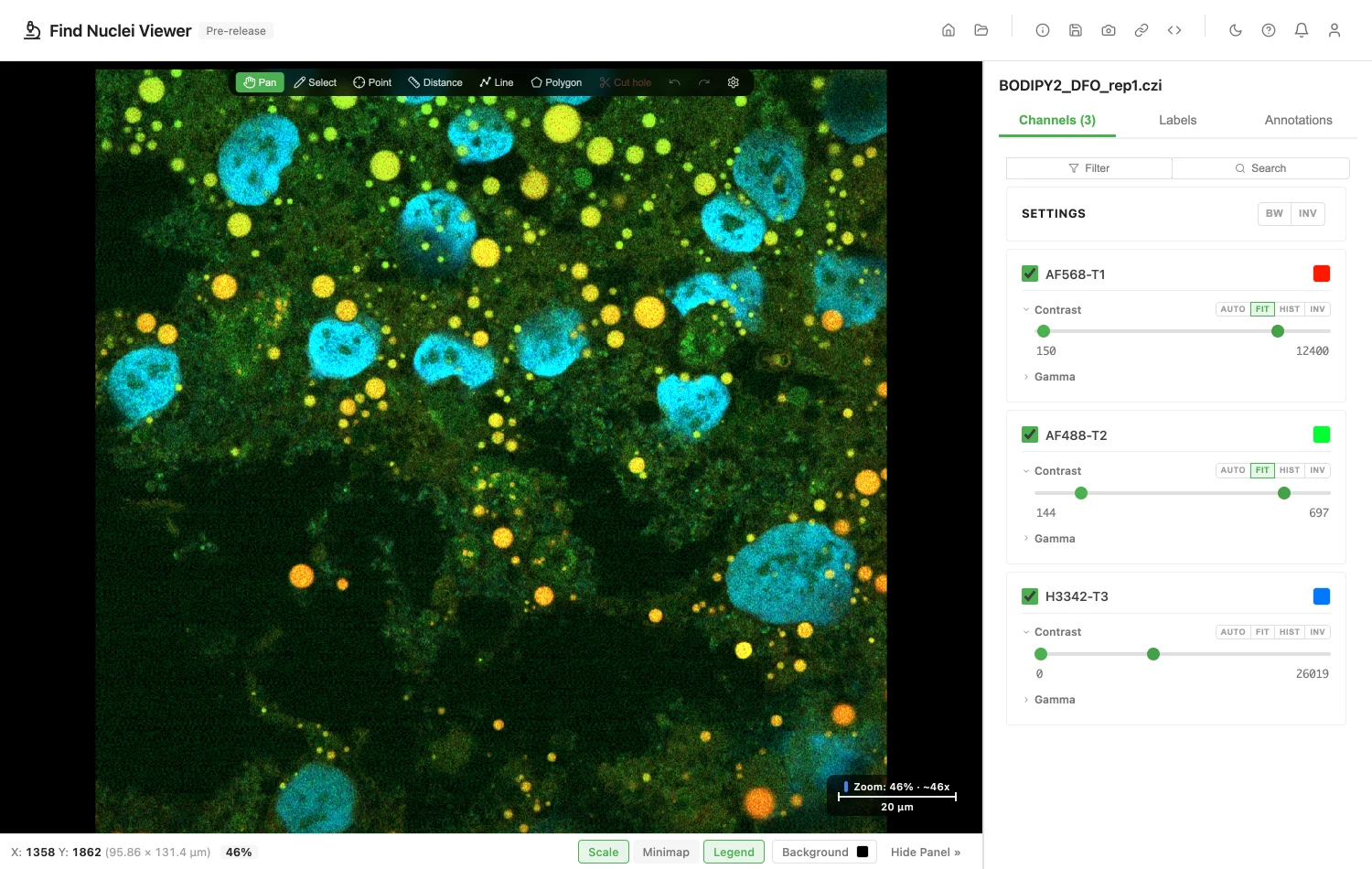
How It Opens
- One file on your disk, in any browser. Drop it on the viewer, or click Open Image and Choose File. See Local Files.
- A plate saved as one file per field, as a folder in Chrome and Edge, or as a zip in any browser. See Plates Saved as One File per Field.
- An address:
https://,s3://orgs://. Paste it under Open Image. See Remote URLs. - Private data, with a private link or a token. See Private Images and Slides.
A Z-stack can also be viewed in 3D, whichever of these it was opened from. See 3D Rendering.
What You Will See
- Z-stacks, time series and channels. Move through Z and time. Z-stacks open in 3D too.
- Scenes. A file with several scenes opens as a series. Pick a scene from the Series list.
- Illumination, view, phase, rotation and block. Each opens as a list to choose from. Each entry shows only its own images.
- Mosaics. Tiles are stitched at the positions ZEN recorded.
- Lower resolutions. When ZEN saved them, zooming out stays fast.
- Well plates, Celldiscoverer 7 included. A plate opens with the well navigator and the well picker. See Plates.
- Colours. Channels open in the colours you set in ZEN.
- Pixel types. 8-bit and 16-bit grayscale, and 8-bit and 16-bit RGB.
- Compression. Uncompressed, Zstd and JPEG XR files open.
- Pixel size and magnification. The pixel size comes from the file, and the magnification from the objective the image names. To set your own, see Pixel Size and Magnification.
A file without a pixel size opens at scale 1. The Image Information dialog says so, and you can enter one there.
Plates
A plate in a CZI holds each field at one resolution. So it opens in Field view only, like an Opera Phenix plate. A note under the Field | Well | Plate toggle says so.
Want plate and well overviews? Convert the file to OME-Zarr. The Opera Phenix guide explains why.
A file with scenes but no plate layout opens as a series of scenes. Plates are read the way czitools reads them.
Try one: the Zeiss CZI tile in the Example Gallery opens a real plate.
Plates Saved as One File per Field
Some instruments save every field of a plate as its own CZI file. IDR idr0011 is one example. The viewer puts them back together as one plate.
A folder. Drop the folder on the viewer. Or click Open Image, go to the Local Files tab and click Choose Data Folder. Folders open in Chrome and Edge. In Firefox and Safari, use a zip.
A zip. Zip the folder without compression. Then drop the .zip on the viewer, or click Choose File on the Local Files tab, or paste its web address. On a Mac, in Terminal:
zip -0 -r plate.zip folderOn Windows, see Zip Without Compression. A compressed zip is refused, and the message says so.
How wells are found. Wells come from the file's own records, never from the file name. Fields in a well follow the time they were taken.
A folder that holds several things. A list titled Choose a dataset appears. Pick a row to open it.
- A plate. The row shows how many fields and wells it holds.
- An image. A single file. When a file does not fit its plate, the row says why. For example, its channels or pixel size differ from the rest.
- A file that cannot be read. The row is greyed out and gives the reason, such as "Not a CZI file."
A folder that holds one thing opens straight away.
One field alone. Open one field file and you see one field. The viewer tells you: "This file is one field of a plate. Drop the whole folder to see the plate."
If a File Does Not Open
The viewer tells you why, and what to do.
| What the file has | What the viewer says |
|---|---|
| JPG, LZW or another compression | This CZI file uses a compression the viewer cannot read yet (JPG). In ZEN, save a copy without compression or with Zstd, and open that. |
| 32-bit float pixels | This CZI file stores Gray32Float pixels. The viewer reads 8-bit, 16-bit and RGB images. |
| Channels of different pixel types | This CZI file mixes pixel types across channels (Gray8, Gray16). The viewer cannot show them together yet. |
| A large mosaic with no lower resolutions | This scene is a large tiled image with no lower resolutions stored, so the viewer cannot show it yet. In ZEN, save a copy with a pyramid, and open that. |
| A plate with rotation or phase | This CZI plate has more than one phase (2). The viewer cannot show that dimension on a plate yet. |
| A file still open in ZEN | This CZI file was not closed by ZEN, so it may be incomplete. Open it in ZEN and save it again. |
| A file split into parts | This CZI file is split into parts. The viewer opens single-file CZI only. |
| A compressed zip | {zip}: The CZI files in this zip are compressed, so they cannot be read in parts. Make the zip without compression (for example zip -0 -r plate.zip folder) and open that. |
| A very large file with no index | This CZI file is too large to open without an index. An index for large files is planned. |
| Not a CZI | This file is not a CZI file. |
One fix for most of them. In ZEN, save a copy without compression or with Zstd, and open the copy. For a big mosaic, save it with a pyramid.
Big mosaics. A tiled scene wider or taller than 3000 pixels needs lower resolutions saved with it. A scene of one tile always opens.
Converting instead. Bio-Formats turns a CZI into OME-Zarr. The conversion guide shows how.
Public CZI Files to Try
- Zenodo. Opens by address. Use the link that ends in
/content, such ashttps://zenodo.org/api/records/7015307/files/W96_B2+B4_S=2_T=1=Z=1_C=1_Tile=5x9.czi/content. A link that ends in?download=1does not open. Try record 10577186 and record 11234863. Both are CC BY 4.0. - OpenSlide test data. The Zeiss folder, CC0. Download a file, then drop it on the viewer.
- Bio-Formats sample images. The Zeiss-CZI folder. Download a file first, the same way.
More places to find public data: Remote URLs.
For Your IT Team
To open a CZI by address, the server must answer byte-range requests and allow them through CORS. For a bucket, allow GET and the Range header in its CORS rules. What the Server Needs has the details.
When a server cannot send parts of a file, the viewer says so. Download the file and open it from your computer. A server that limits requests may slow a large mosaic, since each tile is one request.
Third-party notices
The JPEG XR decoder's licence: Third-party notices.
Privacy
The file is read in your browser. Opening a CZI counts as one opened image of the kind "Zeiss CZI file". The file name and address are never recorded. See the privacy policy.
Image credits
The screenshot uses BODIPY2_DFO_rep1.czi from BioImage Archive study S-BIAD4045, CC0. See Sample Data and Credits.
Product names are trademarks of their owners. Find Nuclei is not affiliated with them.