ImageXpress Plates in the Browser
Open the plates your Molecular Devices ImageXpress system saves with MetaXpress, as they are. Move through every well, field and Z plane.
Free. Nothing to install. Your file stays on your computer.
What You Need
The plate folder, as MetaXpress saved it. It holds the plate description, a small .HTD file named after the plate, and one TIFF per well, site and wavelength, such as Plate1_B03_s2_w1.TIF. Some plates keep their images in TimePoint_1/, and a Z series in TimePoint_1/ZStep_1/, ZStep_2/ and so on. Keep the folders together.
The folder can be on your computer, or at a web address such as a public S3 bucket. Images load as you look at them.
How to Open an ImageXpress Plate
Best in Chrome or Edge
A plate is a folder, and Chrome or Edge on a computer open it as it is. In Firefox and Safari, open it as a zip.
- A folder on your disk, in Chrome and Edge. Drop it on the viewer. See Opening a plate from disk.
- One zip, with or without compression, in any browser, from your disk or its address. See From a zip.
- An address: the
.HTDfile, or the plate folder.https://ors3://. See Opening a plate from the web.
Opening a plate from the web
Open the Open dialog, choose From URL and paste one of these:
- the address of the
.HTDfile, - or the plate folder, when its
.HTDis named after it. MetaXpress names a plate folder<plate>_Plate_<number>and the file<plate>.HTD, so most plate folders open this way.
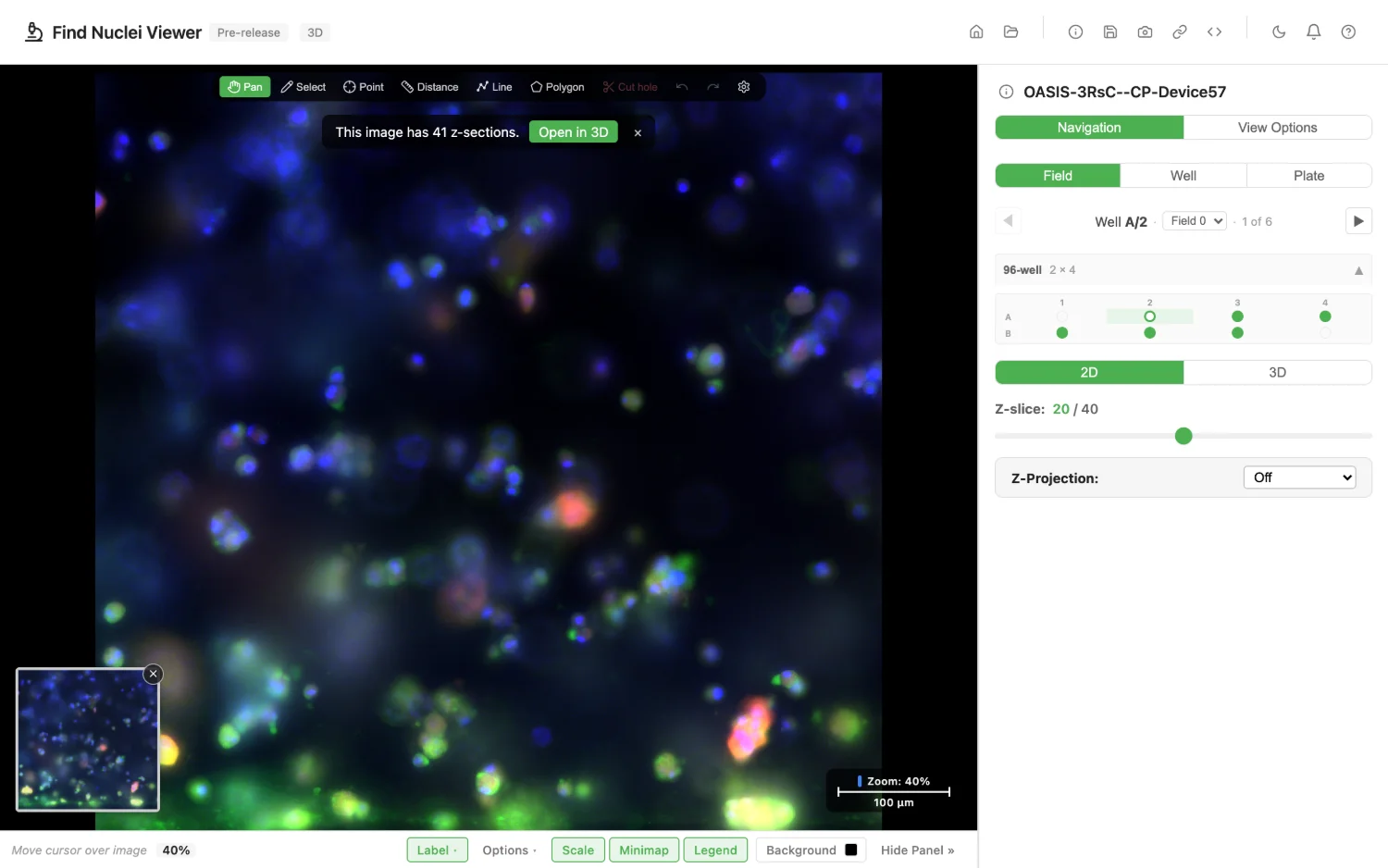
An https:// address and an s3:// address both work. Here is an OASIS plate from the Cell Painting Gallery, a 41-plane Z series from an ImageXpress Micro Confocal, in both forms:
https://cellpainting-gallery.s3.amazonaws.com/cpg0037-oasis/xellar/images/2025_10_29_Batch1/images/OASIS-3RsC--CP-Device57_Plate_40607/

s3://cellpainting-gallery/cpg0037-oasis/xellar/images/2025_10_29_Batch1/images/OASIS-3RsC--CP-Device57_Plate_40607/
If a folder does not open, paste the address of its .HTD file instead. The viewer never lists a folder on a server. It finds the images by the names the .HTD gives them.
Some plates add a code in brackets to every file name, such as Plate1_A01_s1_[A192FCC1-...].tif. The .HTD cannot say what those names are, so such a plate opens from your disk only.
Opening a plate from disk
Open the Open dialog, go to Local Files and click Choose Data Folder. Pick the plate folder, the one that holds the .HTD file. Nothing leaves your computer.
Pick the plate folder, not one of the ZStep folders inside it: each of those holds a copy of the .HTD but only one plane of the plate.
Folders open in Chrome and Edge, as for any dataset folder. Safari and Firefox cannot open folders. See Local Files for the details.
From a zip
Zip the plate folder, or its contents, and open the zip from your disk or by its address, in any browser. Safari and Firefox open a plate this way. With or without compression both work: zip -0 -r plate.zip Plate1_Plate_123/ makes the quickest archive to open.
What to expect
The viewer reads the .HTD file, a few kilobytes, and then only the tags of a few images: one per channel and one per site of the first well. That gives the image size, the pixel size, the emission wavelengths and where each site sits. The pixels of an image are read when you look at it. In a zip made with compression, those few images are unpacked whole; a zip made without compression reads only their tags.
Missing images
A field with no images never shows as black. The canvas says what happened instead. One missing channel is left out of that field; the other channels still show.
The second time, the plate opens faster. The viewer keeps what it learned in the browser's storage. Clear All Data on the start screen removes it.
What is shown
Every Z plane. A Z series shows every plane, with the Z slider and the 3D view. When MetaXpress also saved a projection of the stack (in ZStep_0), the projection is not shown; the planes are.
Every timepoint, with the time slider.
Plate and Well view up to 256 MB. Like an Opera Phenix plate, an ImageXpress plate stores each image at one resolution, with no pyramid. Plate and Well view open when their images fit in 256 MB. The Opera Phenix guide explains why. Want Plate view for a large plate? Convert the plate to OME-Zarr.
Info, in the toolbar or the (i) before the image name, names the format: "ImageXpress plate (MetaXpress HTD, TIFF)."
Channels and colours
Channels take their names from the .HTD file, such as DAPI or Nuclei-Hoechst. Each one is coloured by the emission wavelength its images state. The Channels guide covers the rest.
Does not open
- Folders without an
.HTDfile. The JUMP plates of source_8 and some older sets in the Cell Painting Gallery hold TIFFs only. They do not open. - Images that state no pixel size. The viewer never guesses one. Such a plate shows a message.
- Channels of different image sizes. The channels of a field show together, so they must match.
Limits
- Each image is read whole. A 5120 by 5120 image is 50 MB per channel.
- No flat-field correction. Images show as recorded.
- The embedded viewer does not open these plates. Use the full viewer.
Product names are trademarks of their owners. Find Nuclei is not affiliated with them.