Olympus OIR Viewer
Open the .oir files Olympus and Evident FluoView saves on FV3000 and FV4000 confocal microscopes. You get every channel, Z-stack, time series and lambda scan. OIR files shared on Zenodo open by their link.
Free. Nothing to install. Your file stays on your computer.
How to Open an OIR File
Working with many files?
Chrome and Edge on a computer open a whole folder as a gallery. Firefox and Safari open one file at a time.
- One file on your disk, in any browser. Drop it on the viewer, or click Open Image and Choose File. Once the viewer is installed, a double-click on an
.oirfile opens it too. See Local Files. - A large image saved in several files, in any browser. Select
name.oirand its other parts together and drop them on the viewer. - A folder, in Chrome and Edge. Use this for a large image saved in several files, and for the folder of a tile scan. One image opens. Several show a list with a picture of each, then a gallery of pictures under the image. See Folders, Zips and Series.
- An address:
https://,s3://orgs://, or a Zenodo file link that ends in/content. Paste it under Open Image. See Remote URLs. - Private data, with a private link or a token. See Private Images and Slides.
What You Will See
- Channels by the names FluoView gave them, such as
CH1andCH2, in the colours of their lookup tables. - Lambda scans with each wavelength as a channel, named by its wavelength:
420 nm,470 nmand on. Each draws in the colour of its wavelength, from violet to red. - Z and time. Sliders step through the planes. A Z-stack can also be viewed in 3D. See 3D Rendering.
- 10, 12 and 16-bit data, with a display range that fits their depth.
- Pixel size, Z step and time interval from the file. To set your own, see Pixel Size and Magnification.
An OIR stores one resolution. The viewer makes the lower resolutions itself, so a large stitched image zooms out and opens in 3D.
The viewer was checked against Bio-Formats on sample files from FV3000 and FV4000 microscopes: every plane matched.
Large Images Saved in Several Files
FluoView saves a large acquisition in parts: name.oir, then name_00001, name_00002 and on, with no ending. They belong together. Drop them together, open the folder that holds them, or open name.oir by its address with the other parts beside it. The viewer finds the parts by their names.
A tile scan writes a folder with one .oir per tile, a Map_*.oir and, once stitched, a Stitch_*.oir. Open the folder and pick the stitched image or a tile from the list. Map_*.oir is the map of the scan and holds no image.
If a File Does Not Open
The viewer tells you why.
| What you opened | What the viewer says |
|---|---|
| The first file of a large image, without its other parts | This image continues in name_00001. Drop both files together, or the folder that holds them. |
| An address whose other parts cannot be reached, such as a Dropbox link | This image continues in name_00001, which this link cannot reach. Download both files and drop their folder on the viewer. |
The Map_*.oir of a tile scan | It is the map of a tile scan and holds no image. Open one of the tile files beside it, or the stitched image, whose name starts with Stitch. |
| An image from a colour camera | This OIR holds a colour camera image, which the viewer does not open yet. |
| A lambda scan of several channels | This OIR holds a lambda scan of several channels, which the viewer does not open yet. |
Olympus and Evident slide scanners and cellSens save VSI images instead. See the Olympus VSI Viewer.
Public OIR Files to Try
- DAPI_mCherry_4Z_5Lambda.oir: a lambda scan of 5 wavelengths and 4 Z planes, FV4000. Nicolas Chiaruttini, Zenodo 12773657, CC BY 4.0.
- 497_c1_wt_20w_x60.oir: a neuron, one plane, FV3000. Thabault et al., Zenodo 20758452, CC BY 4.0.
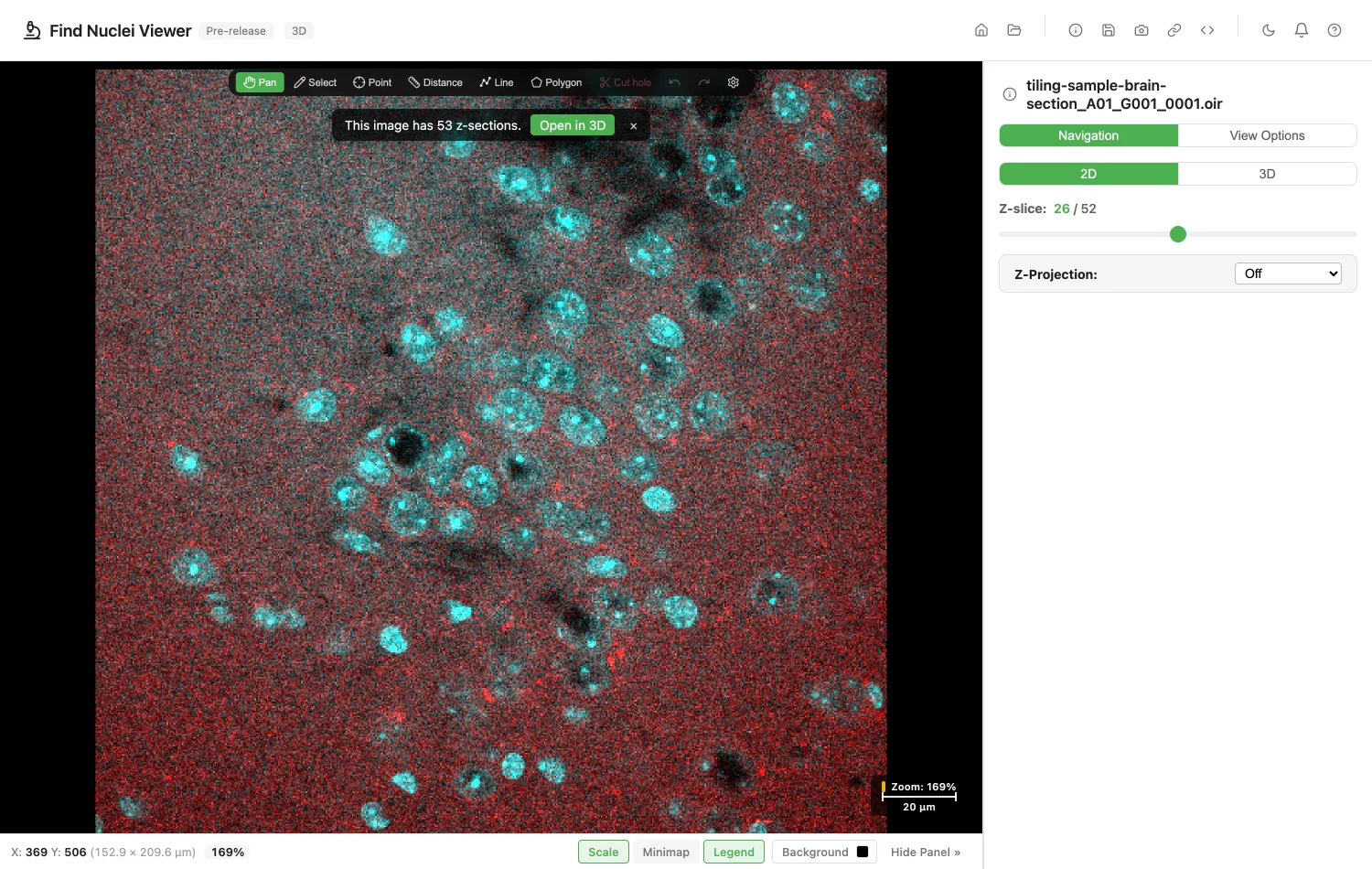
- Stitch_A01_G001.oir: a stitched brain section, 2 channels and 53 Z planes in two files (1.9 GB), FV4000. Nicolas Chiaruttini, Zenodo 13680725, CC BY 4.0.
For Your IT Team
To open a file by address, the server must answer byte-range requests and allow them through CORS. For a bucket, allow GET and the Range header in its CORS rules. An OIR keeps its chunk index near its end, so the viewer also asks for the file's size. The parts of a large image must sit beside the .oir under their own names. What the Server Needs has the details.
Image credits
The screenshot uses tiling-sample-brain-section_A01_G001_0001.oir, Nicolas Chiaruttini and Lucie Dixsaut, Zenodo 13680725, CC BY 4.0. See Sample Data and Credits.
Privacy
The file is read in your browser. Opening one counts as one opened image of the kind "Olympus OIR file". The file name and address are never recorded. See the privacy policy.