TIFF Viewer
Open .tif and .tiff files in your browser: Fiji and ImageJ hyperstacks, images from cameras, and files saved with tifffile or napari. You get every channel, Z-stack and time point as it was saved. Channels keep their Fiji colour when the lookup table is one colour. TIFFs shared on Zenodo open by their link.
Free. Nothing to install. Your file stays on your computer.
How to Open a TIFF File
Working with many files?
Chrome and Edge on a computer open a whole folder as a gallery. Firefox and Safari open one file at a time.
- One file on your disk, in any browser. Drop it on the viewer, or click Open Image and Choose File. See Local Files.
- A folder of TIFF files, in Chrome and Edge. One file opens. Several show a list by name, with a picture of each, and files one folder down are listed too. After you pick one, a gallery of pictures under the image takes you to the next. See Folders, Zips and Series.
- An address:
https://,s3://orgs://, or a Zenodo file link that ends in/content. Paste it under Open Image. See Remote URLs. - Private data, with a private link or a token. See Private Images and Slides.
What You Will See
- Fiji and ImageJ hyperstacks with their channels, Z planes and time points, as Fiji saved them.
- Channel colours from each channel's lookup table. A Green LUT shows green, and Grays shows white. A file with no lookup tables gets Fiji's composite order: red, green, blue, white, cyan, magenta, yellow. One channel alone is white.
- Other lookup tables, such as Fire or Glasbey, in white, with a note. Pick a colour on the channel's swatch. See Channel colors.
- Pixel size, Z step and time interval from a Fiji file. A plain TIFF gives its pixel size when it is stated in centimetres and fits a microscope image. To set your own, see Pixel Size and Magnification.
- Plain multi-page TIFFs as a Z-stack. Sliders step through the planes, and a Z-stack can also be viewed in 3D. See 3D Rendering. A time series saved as plain pages steps through on the Z slider.
- Colour images from a camera as a colour photograph. A transparency (alpha) layer is left out.
- 8, 16 and 32-bit data, whole numbers or 32-bit float. Uncompressed, LZW, Deflate, PackBits, JPEG or JPEG 2000. Classic TIFF and BigTIFF, and Fiji files over 4 GB.
- Pyramidal TIFFs with the resolutions stored in the file. A TIFF with one resolution gets lower ones made by the viewer, so a large image zooms out and opens in 3D.
- An OME-TIFF without
.omein its name opens as an OME-TIFF. See OME-TIFF. An Aperio slide saved as.tifopens as a slide. See Aperio SVS.
Contrast starts from auto contrast on each channel. Fiji's saved display range, ROIs and overlays are not read yet.
If a File Does Not Open
The viewer tells you why.
| What the file has | What the viewer says | What to do |
|---|---|---|
| Bytes that are not a TIFF | This file is not a TIFF. | Check that it is the image file itself. See Supported Formats for other kinds. |
| A file that is cut short or damaged | This TIFF looks damaged or incomplete. | Download or copy it again. If it still fails, open it in Fiji and save it again. |
| Another compression, such as Zstd | This TIFF uses a compression the viewer cannot read yet (TIFF code 50000). | Save it again from Fiji with File > Save As > Tiff. |
| Another pixel type, such as 1, 12 or 24-bit, or 64-bit float | This TIFF has a pixel type the viewer cannot read yet (64-bit float). | In Fiji, choose Image > Type > 16-bit or 32-bit, then save. |
| Colours stored as CMYK, Lab or another colour model | This TIFF stores its colours as CMYK, which the viewer cannot show yet. | Save it again as RGB in the program that made it. |
| An ImageJ file with several samples in each pixel, such as a colour stack with channels | This ImageJ TIFF has a layout the viewer cannot read yet. | In Fiji, choose Image > Color > Make Composite, then save. |
| One plane of all channels over 256 MB, with no pyramid | This TIFF is too large to open without a pyramid. Convert it to OME-Zarr to open it here. | Convert to OME-Zarr to open it with every resolution. |
A file can also open with a note:
| What the viewer says | What it means |
|---|---|
| Channel 1 uses a Fiji lookup table the viewer cannot show yet. It is shown in white. | The channel's lookup table is not one colour. Pick a colour on its swatch. |
| No pixel size in this file. | The file states no pixel size a microscope could have. Set your own. |
| Other images in this file are not shown. | The file holds images of another size or kind. The first image and its stack open. |
| This image is stored with white as zero. It is shown as stored. | The file marks zero as white. The viewer shows the stored values, so bright and dark can look swapped. |
Public TIFF Files to Try
- Arabidopsis pollen tube2.tif: a Fiji hyperstack, three channels, 12 Z planes and 50 time points, 21.5 MB. Zenodo 16966021, CC BY 4.0.
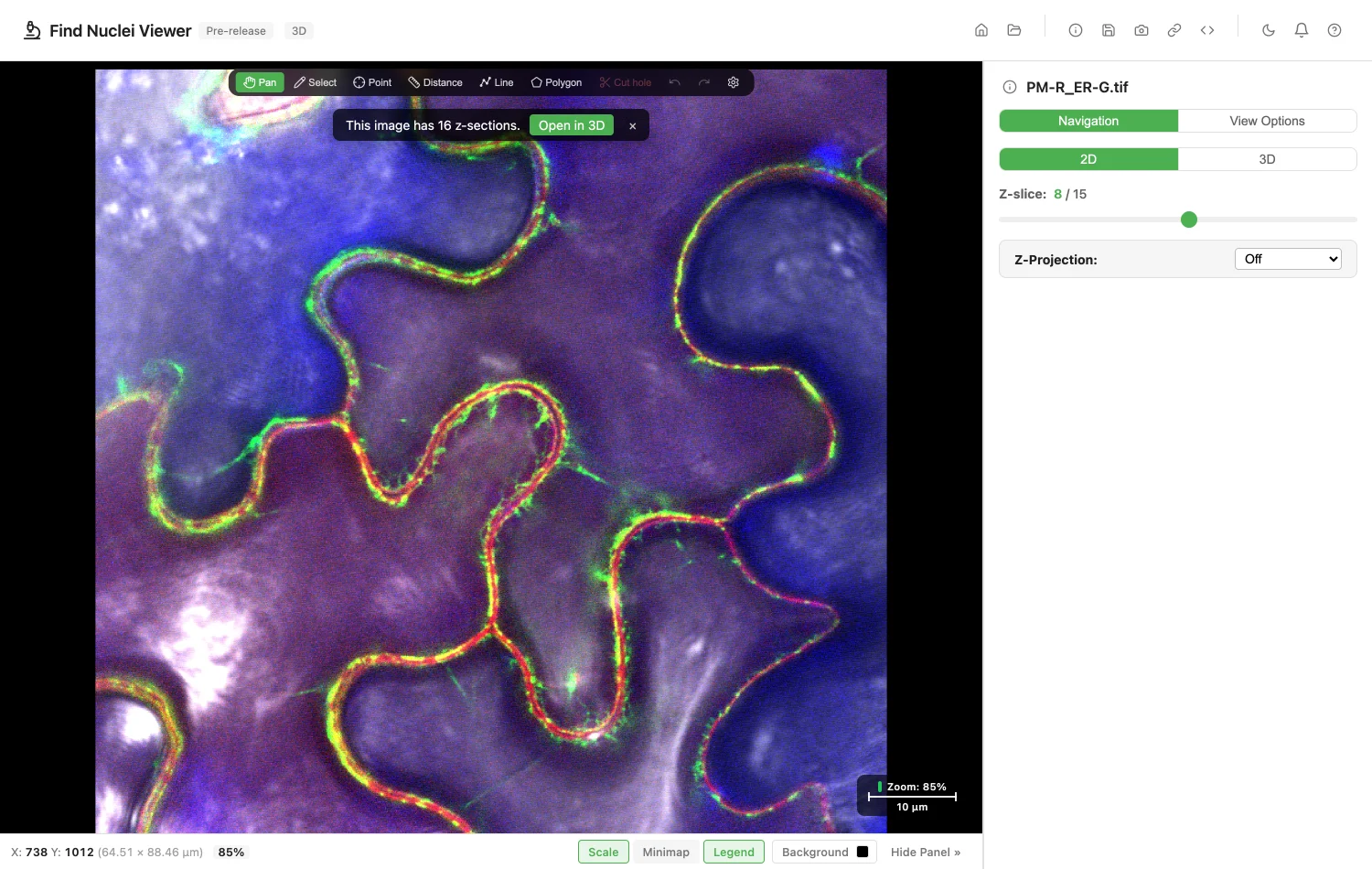
- PM-R_ER-G.tif: a Fiji hyperstack, four channels and 16 Z planes, 134 MB. Zenodo 16966021, CC BY 4.0.
- trpL_150310-11.tif: a time-lapse of bacteria from Fiji, two channels and 20 time points, 60 MB. Zenodo 12600359, CC BY 4.0.
- DataG-Fig1K_confocal.tif: a confocal Z-stack from Fiji, 24 planes, 17 MB. Zenodo 15194428, CC BY 4.0.
- output_period_rotated_001-120_LUVELU_MAX_20170605_W0010-1.tif: a movie of 120 frames in 32-bit float, written by tifffile, 126 MB. It is a plain stack, so the frames step through on the Z slider. Zenodo 4017365, CC BY 4.0.
For Your IT Team
To open a file by address, the server must answer byte-range requests and allow them through CORS. For a bucket, allow GET and the Range header in its CORS rules. What the Server Needs has the details.
Image credits
The screenshot uses PM-R_ER-G.tif, Ivan Radin and Kirk Czymmek, Zenodo 16966021, CC BY 4.0. See Sample Data and Credits.
Arabidopsis pollen tube2.tifandPM-R_ER-G.tif: Ivan Radin and Kirk Czymmek, PCA Imaging Workshop Webinar Series: FIJI Basics for Visualizing and Quantifying Plant Images!, Zenodo 16966021, CC BY 4.0.trpL_150310-11.tif: Simon van Vliet and Annina Winkler, Trackastra integration in TrackMate example, Zenodo 12600359, CC BY 4.0.DataG-Fig1K_confocal.tif: Christine Strullu-Derrien et al., Supplemental Confocal Laser Scanning Microscopy Data - An arbuscular mycorrhiza from the 407-million-year-old Windyfield chert identified through advanced fluorescence and Raman imaging (tif format), Zenodo 15194428, CC BY 4.0.output_period_rotated_001-120_LUVELU_MAX_20170605_W0010-1.tif: Paul Gerald Layague Sanchez, Period wavelet movies of spreadouts, ex vivo models of somitogenesis, subjected to 170-min periodic pulses of 2 uM DAPT, Zenodo 4017365, CC BY 4.0.
Privacy
The file is read in your browser. Opening one counts as one opened image of the kind "TIFF file", or "ImageJ TIFF file" for a file from Fiji or ImageJ. The file name and address are never recorded. See the privacy policy.